You’ve probably seen the ads. Late-night infomercials or glowing displays in drugstores promise to slash your monthly phone bill. The claim sounds too good to be true, but the technology behind MagicJack actually delivers on that promise. It’s a small, cheap USB adapter that bypasses traditional phone companies entirely. Instead of copper wires, it uses Voice over Internet Protocol (VoIP) to route calls. You can dial cell phones, landlines, or other VoIP users without paying standard carrier rates.
The original device had a major limitation. Your computer had to stay on and connected to the internet 24/7. If you shut down your PC, the phone went dead. The new MagicJack Plus changes the game. It plugs directly into your router or modem. No computer required. Just broadband internet and a wall outlet.
Breaking Down the Costs and Compatibility
Traditional landlines are expensive. Even basic domestic service runs into the hundreds of dollars yearly. Most VoIP services undercut them by bundling caller ID, call waiting, and voicemail into a low monthly fee. MagicJack aims to go further. It offers extremely low annual fees for unlimited calls to the US, territories, and Canada.
The device is also highly portable. You can take it to a hotel or even abroad, provided you have internet access. Use it as a second line, ditch your old landline, or just stop paying roaming charges.
Here is how the hardware and software stack up between the two versions.
What is MagicJack and what are its requirements?
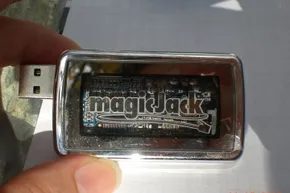
Dan Borislow invented the device. It launched in late 2007. Both the original silver box and the newer MagicJack Plus are analog telephone adapters (ATAs). They are roughly the size of a matchbox.
The original MagicJack uses a USB connector and a standard RJ11 phone jack. It works by installing software on your computer. You plug a phone into the jack, register the device, and you are ready to go. You can skip the physical handset too. Use the soft-phone app to dial via a virtual keypad. Talk through your computer speakers, microphone, or a headset.
There is a catch with the original. It demands your computer stay awake. If the machine sleeps or shuts down, you lose incoming calls. Voicemail and call forwarding still work, but you cannot pick up the phone.
The MagicJack Plus solves this. It adds an Ethernet port and its own motherboard. You still need to plug it into a computer initially to set it up and register. After that, you can unplug it from the PC. Connect it to your broadband modem via the included Ethernet cable. Plug in the AC adapter. Connect your phone. You are live.
This version removes the need for a constant computer presence. The catch? You still need broadband internet.
Operating system support varies. The MagicJack Plus works with Windows XP, Vista, 7, and 8. It also supports Intel-based Apple Macintosh OS. The original silver MagicJack supports those same systems except for Windows 8. Linux users and non-Intel Mac owners are currently out of luck. Neither version supports them.
What are MagicJack’s features?
What You Get With MagicJack Plus
If you bought a MagicJack Plus back in fall 2013, that purchase included six months of service. This covers unlimited calls to the U.S., Puerto Rico, the U.S. Virgin Islands, and Canada. It holds even if you are traveling abroad. Calling other MagicJack users is free anywhere in the world. International calls require pre-paid minutes.
You can buy a year or five years of additional service during setup or later. The service includes voicemail, caller ID, call waiting, call forwarding, 411 directory assistance, conference calling, and E911. That emergency service sends your address with the call.
Voicemail is accessible via the computer software or by calling your number. You can set up an email to receive voicemails as audio attachments. The software saves contacts and call history logs.
MagicJack gives you a free number. You can select the area code and prefix if available. It does not have to match your location. Initially, customers could not keep existing numbers. Now you can port your number or pick a Canadian or vanity number for extra annual fees.
There are iOS and Android apps through iTunes and Google Play. Use them on phones or tablets. You can use WiFi or data to make VoIP calls to the U.S., Canada, and other MagicJack numbers. This avoids using minutes or roaming charges. Without a paid account, the app assigns a random outgoing number. You can receive calls too. The caller must dial a special number then enter your app number.
How the Tech Works
MagicJack uses VoIP. You bypass traditional twisted-pair copper lines in your home. You are not making analog calls. You use hardware and software to convert your call into a digital signal. It sends over the Internet. Calls still hit telephone network lines eventually.
This is where the business model helps. YMax Communications is the parent company. Dan Borislow and Don Burns founded it. It is a phone network. It is a competitive local exchange carrier (CLEC). YMax holds CLEC certifications in all 50 U.S. states.
It does not pay other companies to originate calls on landline networks. It only pays to terminate calls on others’ networks. It can bill other companies when their users call MagicJack users. As a CLEC, it gets phone numbers for free. It can resell them to other providers. It is a phone company as much as a VoIP device provider.
VocalTec invented VoIP. It merged with YMax Communications and MagicJack in 2010. MagicJack is now officially MagicJack VocalTec Ltd. The company is headquartered in Israel. The main warehouse is in West Palm Beach, Fla. They hold various VoIP and MagicJack patents.
MagicJack is not the only option. The next step is comparing it to other VoIP providers.
The Price of Cheap VoIP: Comparing MagicJack to Ooma, Vonage, and netTALK
The defining feature of MagicJack, aside from its tiny form factor, is its aggressive pricing. The original hardware sat around $40 and included a full year of service. After that, the annual renewal was just $20. That’s annual, not monthly. The newer MagicJack Plus lists for $70 but typically sells for $50. It comes with six months of service tacked on. You can pay $29.95 yearly for renewals. Or, if you want to lock in a lower rate, you can prepay for five years at an equivalent of $19.95 per year.
Most other VoIP providers either charge more for the hardware or run higher fees. And they usually bill monthly. MagicJack does have one real competitor on price though.
The landscape includes Ooma, Vonage, and netTALK. The Ooma Telo device costs about $150. It gives you unlimited calling within the U.S. You only pay government fees and taxes. If you want to call outside the States, Ooma has plans starting at $9.99 a month. Or you can do per-minute pay-as-you-go. Vonage provides the equipment. Their unlimited domestic and international plan runs $29.99 a month. They have cheaper plans too. Limited minutes for U.S. and Canada land at $11.99 a month.
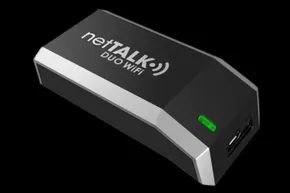
The closest price match is the netTALK Duo. You get a $50 version or a $65 WiFi version. Both plug into your computer or router. They include one year of service to the U.S. and Canada. Additional years cost $29.95. You can add enhanced calling plans for extra monthly or annual fees. There is an SMS text plan too. netTALK also has a free app. But it doesn’t give you an incoming phone number. You’re limited to 50 free minutes a month.
With all these VoIP choices, including MagicJack, you might still pay government fees and taxes. That includes monthly E911 charges. Any extra services you pick will likely incur monthly or annual charges. Research your options thoroughly. Don’t just assume the sticker price is the final price.
VoIP service is also available through cable or phone companies that offer Internet service. These can be fairly cheap with a package deal. To compare all options to each other, or to traditional phone service, you have to consider your calling area and phone number needs. Factor in the cost of the required broadband Internet service too.
There are other communication alternatives. Skype lets you video or voice chat with other users. It has plans that allow you to call mobile and landline phones from software on your computer, tablet, or mobile device. Rates vary monthly or per-minute. Google Voice gives you a number. It forwards calls to any or all of your phones. It sends transcribed voice mails. But the service depends on you already having some sort of existing phone service. Various instant messaging programs and social networking sites also allow voice and video chat. They’re not the same as having a home phone line though.
What are MagicJack’s limitations?
The original MagicJack required you to leave your computer on all the time. You couldn’t use your existing phone number. This was all fixed with the newer MagicJack Plus. But there are still notable limitations. Depending on your wants and needs, they range from minor annoyances to deal breakers.
As with all Internet-based services, if the Internet or power goes out, you can’t make or receive calls. Twisted-pair copper phone lines carry power to phones. The newer coaxial cable and fiber optic lines we use for Internet these days do not. Some VoIP services provide optional battery backups that last a few hours. MagicJack is not among them.
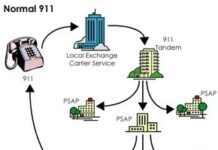
Regarding E911 service, when you call 911 with MagicJack, your address can’t be automatically detected. You have to register your home address with MagicJack. Otherwise, emergency services won’t properly locate you. It won’t work if you are using the device in other locations. It only works in cities where the Public Safety Answering Point (PSAP) has a system that can receive the address information. You will need to make sure the address is updated if you move.
There might also be issues with getting phone numbers in some area codes. If yours isn’t available, you can pick a phone number with a different area code. You can switch if and when yours becomes available. This likely comes at a monetary price.
Other minor issues include the following:
- MagicJack is partially advertisement supported. You will see ads in its software. This is why the cost to users is so low.
- You can only control the device’s volume when it is plugged into a computer. Otherwise, you have to rely on the attached phone’s volume controls.
- It cannot be used to call 900, 976, or other numbers that require per-call fees. Although that could also be considered a perk.
Also, if you are using your MagicJack connected to your computer, it could be felled by any number of computer issues. That might be something to consider when choosing the type of device or service you pick.
Controversies and Legal Issues
The Legal and Regulatory Heat
MagicJack wasn’t exactly a model of corporate diplomacy. The friction started early. Dan Borislow, the founder, didn’t just compete with netTALK; he attacked it. In a 2010 interview, he openly questioned the quality and survival chances of his rival. That wasn’t enough. In 2012, MagicJack sued netTALK for patent infringement. The court didn’t buy it. The case was dismissed.
Then came the clash with Boing Boing.
In April 2008, the tech blog published an article that called out specific, shady clauses in MagicJack’s end-user agreement. The issues were real. MagicJack claimed the right to analyze the phone numbers you called. Why? For advertising. They also forced binding arbitration for any legal disputes. The user agreement itself was buried. It wasn’t clear at purchase. It wasn’t clear at installation. Boing Boing also pointed out the lack of an uninstaller. And some weirdities on the website.
MagicJack sued for defamation. They lost. In 2010, the case was dismissed. MagicJack had to pay about $50,000 in legal fees. The company claimed the article was unfair. The court didn’t care.
Since then, they’ve tweaked things. The uninstaller is easier to find. The website is less hostile. But the core issue remains. The terms of service still allow them to analyze your call data for ad targeting. You can’t opt out.
The Florida Attorney General also got involved. Accusations flew. MagicJack was charging debit cards during the 30-day free trial. They hid limitations. Complaints were mishandled. It was a mess. They settled. They paid a fine. They didn’t admit guilt, but they fixed the practices.
Check the fall 2013 FAQ. It’s clearer now. Credit cards won’t be charged during the trial. A hold might appear, but no charge. You only pay if you buy more than two devices or extra service years. Debit or check cards? You get charged immediately. Refund if you return it within 30 days. It’s a loophole, but it’s visible now.
What Do Users Actually Think?
Most reviews agree: MagicJack works. It is cheap. That’s the headline.
Early versions of MagicJack required your computer to be on 24/7. You couldn’t port your number. If you disconnected, the line died. MagicJack Plus solved this. The computer requirement is gone. Number porting works. Those old complaints are dead history.
Call quality? The original device struggled. It wasn’t quite landline quality. But it was as good as, or better than, cellular. Interference from other software, bandwidth hogging, or a weak connection could cause distortion. Delay was common. The new MagicJack Plus claims better quality. On par with landline. In practice, it’s decent. Not perfect. But acceptable for the price.
Customer service is the weak point. There is no phone number to call. Support is online documentation and live web chat. You have to dig through the knowledge base to find the chat button. Once you’re there, you talk to a real person. It works for simple issues. For technical nightmares? Chat is frustrating. You can’t just talk it out. You have to type. It’s slow. It’s rigid.
Documentation is sparse. Setup is upsold heavily. You have to be vigilant. Opt out of every extra. Every add-on. Every extra service. If you click “yes” by accident, you’re paying for things you don’t need. It’s a design choice. A predatory one, maybe. But effective at squeezing revenue.
Despite the friction, the reviews are largely positive. The negatives are acknowledged. But the consensus is clear. It works. It’s cheap. Once you navigate the setup, it functions.
Where to Buy and Who Uses It
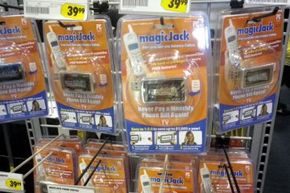
MagicJack is everywhere. The company website. Major retailers. Online marketplaces. The purchase location changes the trial terms. Buy from the manufacturer? The 30-day free trial starts on the order date. Buy elsewhere? You’re stuck with the retailer’s return policy. No magic trial. Just store credit or refund rules.
Sales figures are staggering. Over 11 million devices sold since launch. That’s a lot of plastic and USB cables.
The demographic is interesting. Retirees love it. They have landlines. They hate the cost. This is a cheap replacement. It’s also popular with people overseas. Want to call the U.S. or Canada cheaply? MagicJack is a tool. It bypasses expensive international rates.
And then there’s the economic angle. Tough times? People cut costs. MagicJack fits. It’s a viable option for cheap in-home service. You can ditch the landline. You can keep the cell. Or use MagicJack as an extra line. Long-distance savings. Preserving mobile minutes.
It’s worth considering if you travel abroad. Find a location with broadband. Plug it in. Make calls. It works.
The device itself is small. Plugs into a USB port. No batteries. No complex setup beyond installation. Just plug and play. The Plus version adds stability. The original was a hack. The Plus is a product.
Is it perfect? No. The ad analysis clause is invasive. The support is limited. The upsell is annoying. But for the price? It’s hard to beat. The market has shifted. Landlines are dying. Cell phones are expensive for long calls. MagicJack sits in the middle. A bridge. A cheap alternative.
People are still buying it. 11 million is not a small number. It suggests a need. A demand for cheap communication. The controversies are in the past. The technical issues are resolved. The product remains.
For some, it’s a primary line. For others, a backup. A travel companion. A way to call family without breaking the bank. The debate continues. But the sales figures don’t lie. People want it. And they keep buying it.