Moving to a new computer is usually a nightmare of missing settings, broken shortcuts, and scattered personal files. Most people just copy-paste documents and start over. It works for basic data. It fails for everything else. EaseUS Todo PCTrans Free exists to solve that specific pain point. It is not just a file mover. It is a full environment migrator.
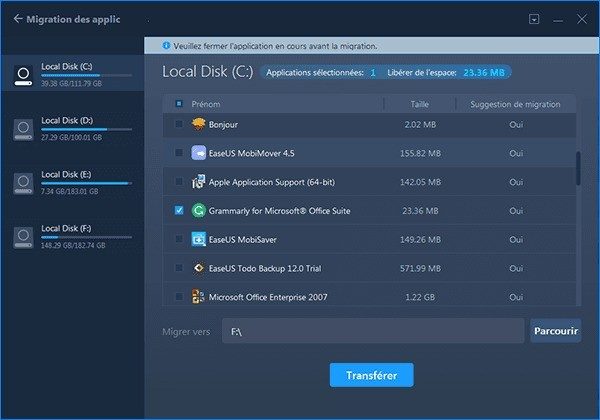
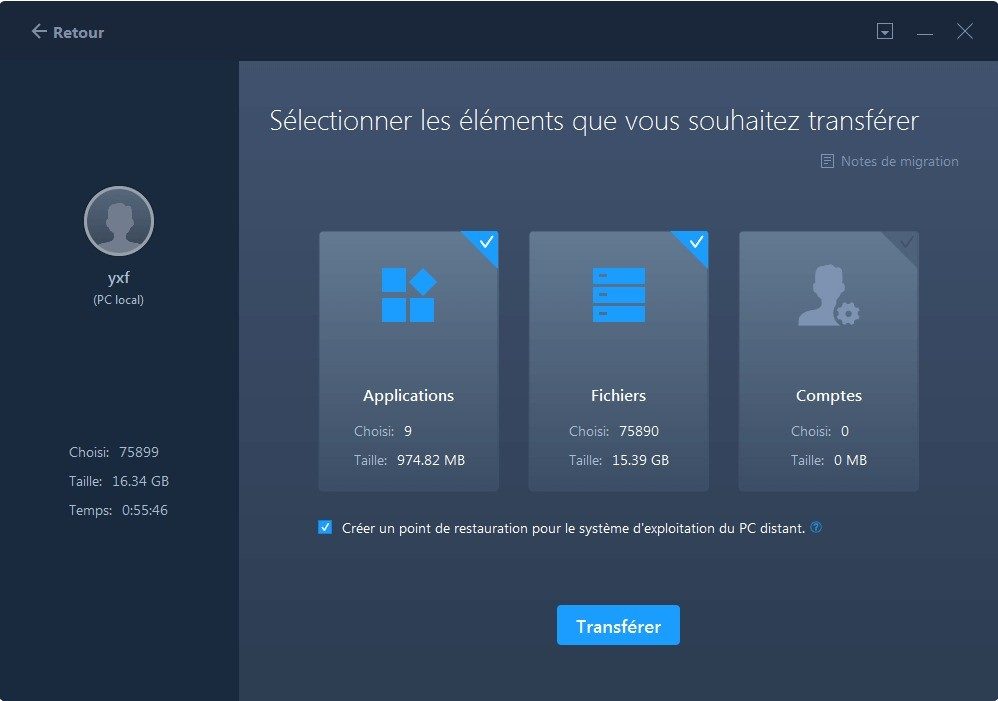
The tool lets you transfer installed applications, user accounts, and files in one go. You do not lose your email signatures. You do not lose your browser extensions. The software handles the heavy lifting so you can plug into your new machine and keep working immediately. This applies to personal users switching laptops. It also helps IT pros managing fleets of machines without rebuilding software licenses from scratch.
Why Use EaseUS Todo PCTrans Free?
The core value proposition here is continuity. You are not just moving bits. You are moving context. If you upgrade your hardware, you expect the same workflow. Manual migration breaks that. You have to reinstall your email client. You have to reconfigure your network drives. You have to remember where you saved that specific project file from three years ago.
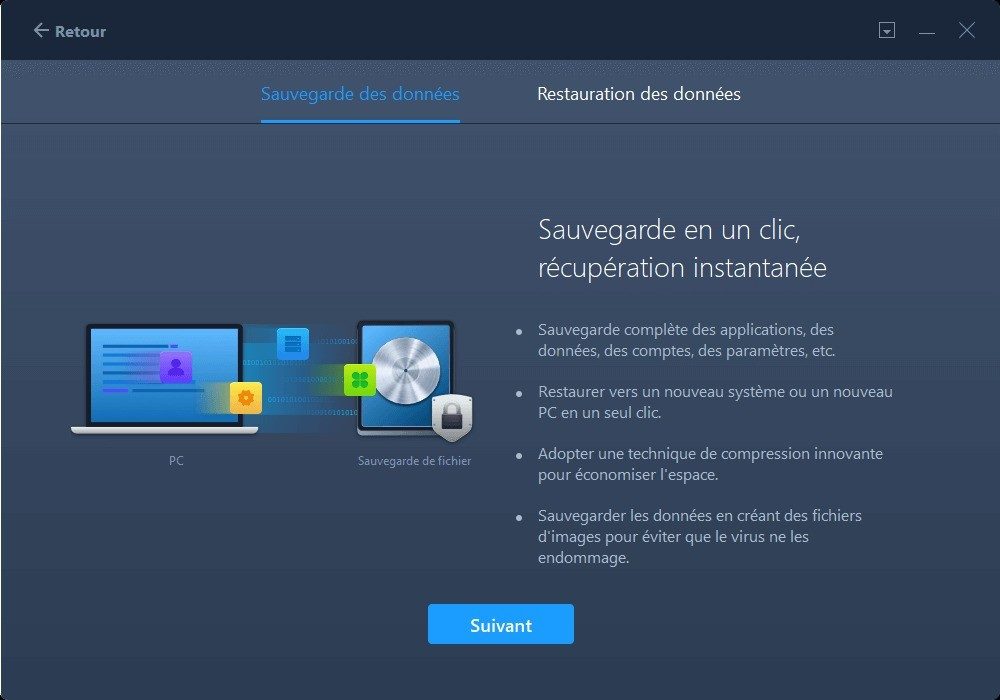
EaseUS Todo PCTrans Free minimizes the risk of data loss during these transitions. It detects the source and target machines on the same network. It then moves the data securely. There is a built-in backup feature. This creates a copy of essential elements before the export begins. If something goes wrong, you have a safety net. This is crucial when recovering data after a system crash or hardware failure.
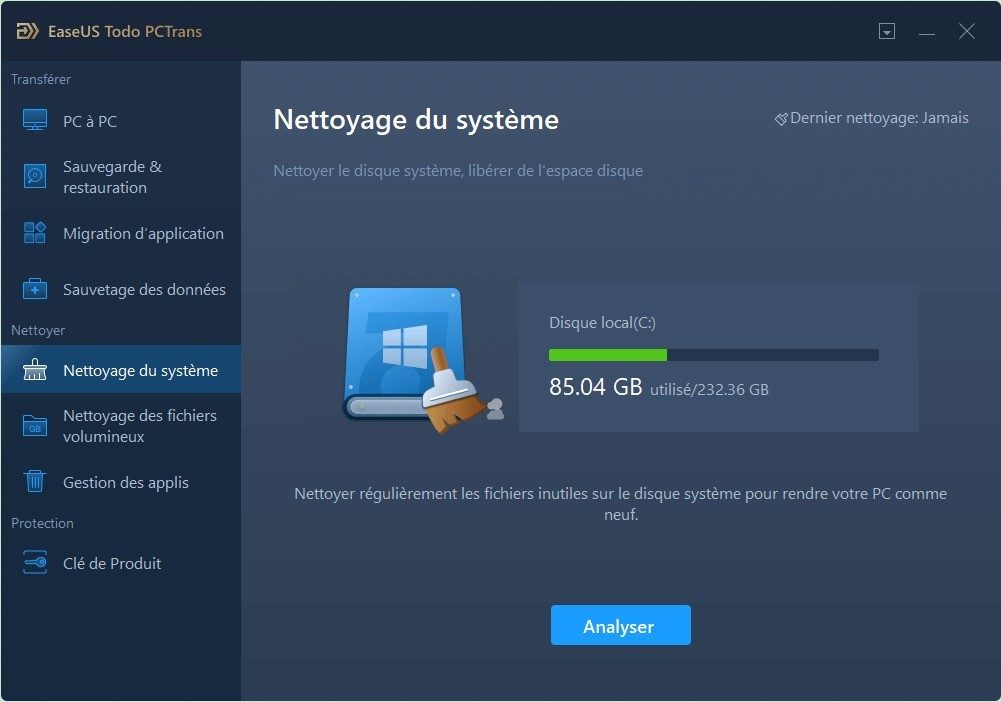
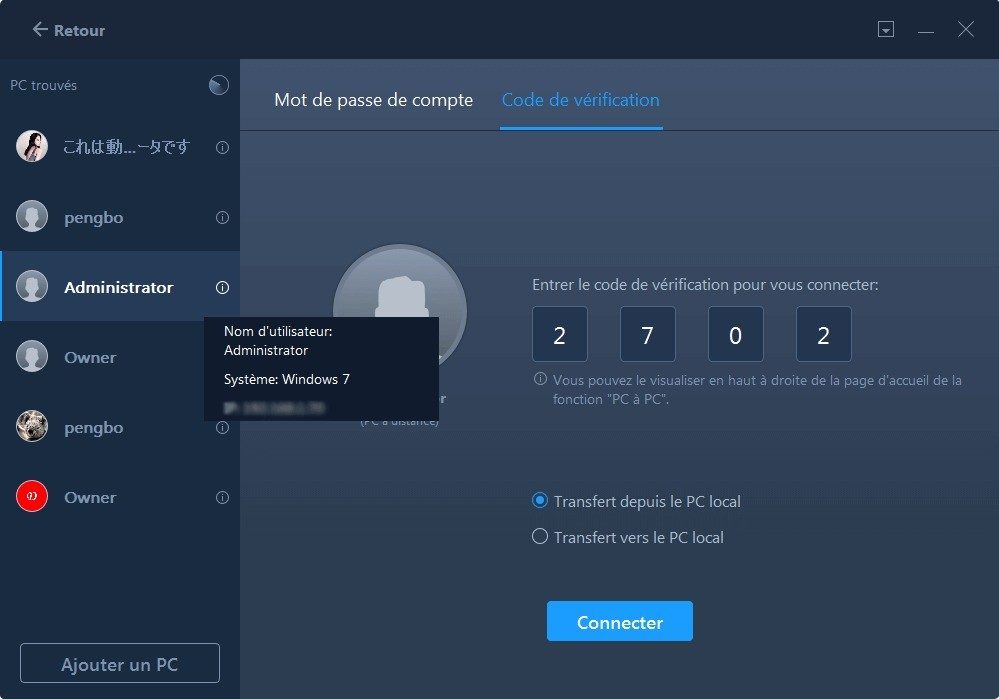
The interface is surprisingly clean. It guides you through the detection phase. It handles the transfer progress. You do not need a degree in computer science to operate it. The design assumes you want the job done quickly. No complex parameters. No technical jargon. Just click. Transfer. Done.
Compatibility and Installation
This tool is strictly for Windows. There is no Mac version. No Linux support. It does not work on Android or iOS devices. This limitation is notable if you are in a mixed-OS environment. However, within the Windows ecosystem, it is broadly compatible.
It supports a wide range of versions. We are talking about Windows XP, Vista, 7, 8, 10, and 11. Yes, even the legacy systems are covered. This makes it useful for businesses or individuals still running older hardware. The installation process is fast. It takes a few minutes. The setup wizard is in French, which is helpful for local support. It asks for language preferences, license type, and directory paths. Nothing complicated.
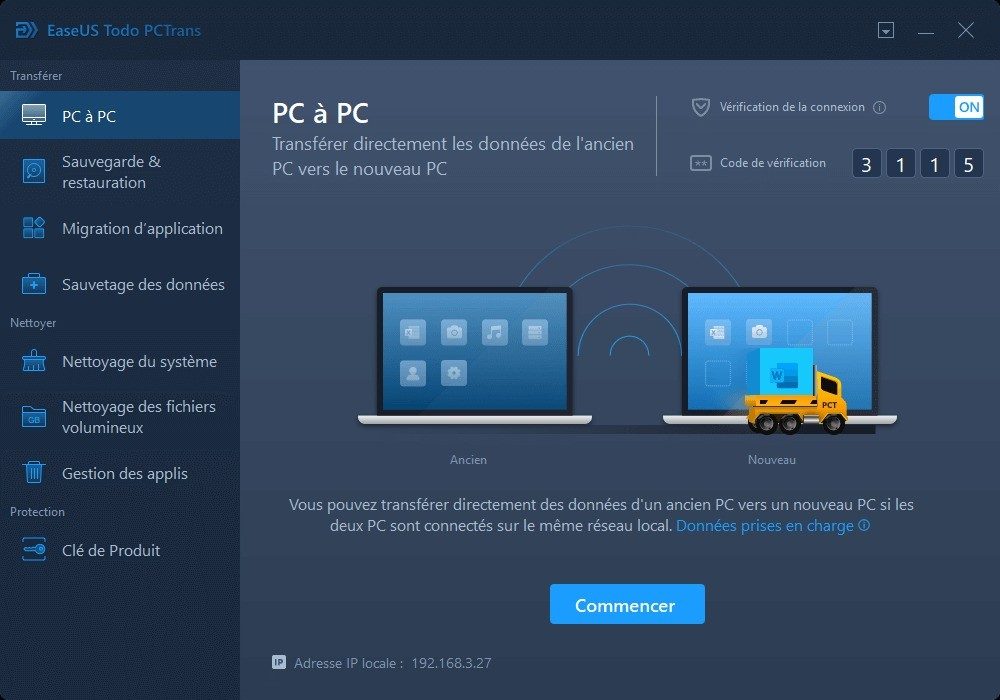
Once installed, you choose your transfer mode. You can go PC to PC. You can use a backup image file. You can use external storage devices like USB drives. This flexibility covers most migration scenarios. Whether you are on the same Wi-Fi network or using a portable drive, the software adapts.
What the Free Version Actually Offers
Here is the catch. The free version has limits. It restricts the volume of files you can transfer. It limits the number of applications you can move. This is a deliberate strategy by EaseUS. They want you to try the tool. Then they want you to upgrade.
For most personal use cases, the free tier is enough. You might not be moving terabytes of data. You might only need to migrate a few key applications. The restrictions do not break the process. They just cap the scope. If you are a power user with hundreds of specialized software tools, you will hit the wall. Then you would need EaseUS Todo PCTrans Pro. But for the average user upgrading a home PC, the free version works.
It handles the basics well. Files move. Settings move. Apps move. The security protocols ensure the data arrives intact. You are not left with corrupted executables or missing registry keys. The migration feels seamless because the software abstracts the complexity away.
Is it perfect? No tool is. But for bridging the gap between two Windows machines, it removes the friction that usually makes tech upgrades stressful. You avoid the “setup hell” of re-downloading and reconfiguring everything. You just pick up where you left off. That is a significant time saver.
The landscape of PC migration tools is crowded. Many promise ease. Few deliver reliability. EaseUS has carved out a niche by focusing on the application layer. They know that files are easy to copy. Applications are hard to reinstall correctly. By solving the harder problem, they provide real value. The free version is a gateway. It lets you test the waters. If you need more capacity, the paid tier is there. But for now, the free edition does what it says on the tin. It moves your digital life to a new home. Without the mess.
Why EaseUS Todo PCTrans Free Outpaces the Competition
In the crowded Windows data migration space, EaseUS Todo PCTrans Free stands out. It’s not just about moving files. It’s about the sheer simplicity of the setup. Most competitors leave you guessing. Tools like PCmover Express do cover files and apps, sure. But others? They strip away installed applications and user settings. They leave you with just data. That’s a half-measure.
EaseUS brings a translated interface. It offers solid technical support. The documentation isn’t an afterthought. It’s complete.
When you swap hardware, you usually dread the full reinstall. It’s tedious. It’s risky. EaseUS sidesteps that pain. It handles software dependencies intelligently. It limits conflicts. You aren’t left reconfiguring your entire professional or personal environment from scratch.
IT pros and fleet managers know this value. It’s a rapid alternative for duplicating configurations across multiple machines. It preserves productivity during unexpected maintenance windows.
How Version Updates Keep You Safe
The software hasn’t stayed static. It has evolved. New Windows updates break old tools constantly. EaseUS reacts to OS shifts quickly. This responsiveness is a huge selling point.
Why does this matter? Obsolescence. Data loss.
You want to protect against software rot. You want to avoid accidental data deletion when switching machines. The tool’s ability to integrate with the latest Windows developments makes it a safer bet than legacy alternatives. It doesn’t just migrate; it adapts.
Licensing, Versions, and the Free Reality
People ask about discounts. Specifically, student editions. Do they exist?
Not in 2024. EaseUS offers two main paths:
– EaseUS Todo PCTrans Free : For personal or occasional use.
– EaseUS Todo PCTrans Pro : Paid license. Unlimited transfers. Advanced support features.
If you are a student, the free version likely covers your essential needs. There is no specific academic pricing model listed right now.
What about older versions? You can technically download them. Some specialized repositories host them. You can even ask support directly. Why would you? Compatibility with ancient systems.
But here is the catch. Security patches lag in old builds. Technical support prioritizes current releases. The recommendation is clear. Use the latest version.
Updates are semi-automatic. The app notifies you. It invites you to download and install. This keeps you compatible with modern Windows bugs and security holes. Manual intervention isn’t always needed.
No Certifications Needed
There is no official certification for EaseUS Todo PCTrans Free. You won’t find a pro exam. You don’t need one.
The interface is intuitive. The knowledge base is robust. The editor provides tutorials. Start-up guides are plentiful. Explainer videos exist on their site.
Need help? Support is there.
This setup makes the software accessible. Novices can navigate it. Advanced users can leverage it. It handles backups, migrations, and restorations across different Windows machines. The reliability is what builds its reputation. The ease of use keeps people coming back.
It works. That’s often enough.
What EaseUS Todo PCTrans Free Actually Does for Windows Users
You are looking at the hard limits before you touch the software. This is not a guess. It is a checklist. You need to know if your machine fits. The tool moves data. It does not magic it. It transfers applications, personal files, settings, and user accounts. That is the scope. Anything outside that scope stays behind.
The publisher is EaseUS. You know the name. The license is freeware. That means free. But it comes with chains. You hit a ceiling on the number of applications and total data volume. If you need more, you buy Pro. The category is utilities. Specifically, data migration.
Operating system support is broad. We are talking Windows XP through 11. Both 32-bit and 64-bit. It is still running on old hardware. The language pack includes French and English. Multilingual by default. Installation is a standard Windows application. You get an installer wizard. It is not portable. You install it, or you don’t use it.
Hardware Requirements and Transfer Methods
Minimum configuration is simple. A standard Windows PC. Administrator rights. You cannot run this as a guest user. You need available disk space. The software detects your environment. It checks for compatibility.
Internet connection is optional. You do not need it for a local transfer. Direct PC to PC works over a local network. You do not need the cloud for that. Internet is only for downloading the installer. Or for updates. Or for support.
There are three main ways to move data. First, PC to PC. Local network. Second, backup image. You create a file. You restore it elsewhere. Third, external media. You copy to a USB drive. You plug it into the new machine.
The software detects PCs on the network automatically. This saves time. You do not hunt for IP addresses. You select the target. You start the transfer. It is straightforward.
Limitations of the Free Version
Here is the catch. The free edition has limits. You cannot move everything. There is a cap on applications. There is a cap on data volume. You need to check the current limits before you start. They change. But the principle remains.
If you are migrating a few programs and some documents, free might be enough. If you are moving an entire workstation with heavy software, you will hit the wall. Then you pay. Or you do it manually. Manual is slower. Manual is error-prone.
The tool includes backup and restore via image. This is a bonus. It helps with recovery. You can restore your system state. It is not just for migration. It is for safety.
Support is online. Knowledge base. Guides. No phone number. No live chat. You read. You solve it yourself. If you get stuck, you search. That is the model.
Why This Matters for Your Next PC Swap
You are switching computers. The old one is dying. Or you bought a new one. You have data. You need it on the new machine. Applications do not transfer automatically. Windows does not copy your settings. You have to do it.
EaseUS Todo PCTrans Free handles the heavy lifting. It moves the registry keys. It copies the program files. It adjusts the paths. You do not reinstall everything from scratch. You save hours. You save frustration.
Download the official installer. Do not use third-party mirrors. Integrity matters. You do not want malware in your migration tool. The source must be clean. Verify the checksum if you are paranoid. You should be.
This approach prepares you for a change. It helps after a crash. It duplicates a workstation. It is a practical solution. Not a perfect one. But practical.
The Hidden Cost of Cloud Lock-In
You signed the contract. You migrated the data. Now you are stuck. This is the unspoken reality of vendor lock-in, the silent killer of strategic flexibility. It is not just a technical hurdle. It is a financial trap. And it is everywhere you look.
When you choose a proprietary API or a specific cloud service’s unique storage format, you are not just buying software. You are buying a leash. The initial migration might feel smooth. The dashboard looks clean. The support team is responsive. But six months later, you realize you cannot export your data without paying a premium or waiting weeks for a custom script.
Why does this happen? Because vendors design their systems to be sticky. Not by accident. By design.
Consider the difference between open standards and proprietary extensions. An open standard, like SQL or standard HTTP, lets you move data between platforms with relative ease. You can switch database providers or hosts without rewriting your entire backend. But add a proprietary function? A unique authentication method? A custom data schema? Suddenly, you are trapped.
“Lock-in is not a bug. It is a feature for the vendor and a liability for you.”
This is why you need to audit your tech stack for single points of failure. Look at your integrations. Are they built on open protocols? Or do they rely on a specific vendor’s private API that may change without notice?
Why Portability Matters Now More Than Ever
Market shifts are inevitable. Acquisitions happen. APIs get deprecated. Security vulnerabilities are discovered. If your business logic is tied to a single provider’s idiosyncratic implementation, you are at risk.
Think about data portability as a form of insurance. It does not prevent a vendor from raising prices. It does not stop a service from going bankrupt. But it gives you leverage. It gives you an exit strategy.
Without an exit strategy, you are no longer a customer. You are a hostage.
The cost of lock-in is not just the money you pay for inefficient services. It is the innovation tax. You cannot adopt a better, cheaper, or faster solution if migrating is too complex or too expensive. You stay with the mediocre option because the friction to leave is too high.
How to Break the Cycle
You have to build for exit from day one. This means avoiding proprietary shortcuts. It means choosing tools that export data in standard formats like CSV, JSON, or XML. It means documenting your dependencies clearly.
If a vendor cannot tell you exactly how to extract your data in a usable format, walk away. Simple as that.
Look for abstraction layers. Use middleware that decouples your core business logic from the specific implementation details of any single vendor. This is not just for enterprise architects. It is for anyone who wants to retain control over their digital assets.
The cloud promised freedom. Mobility. But it delivered complexity and dependency. The trick is to navigate that complexity without building your own cage.
The Future of Choice
As AI and automation become more integrated into our workflows, the risk of lock-in grows. These systems often require vast amounts of training data and specific computational resources. If you build your AI strategy on a closed ecosystem, you are betting your future on one company’s roadmap.
Diversification is not just for investment portfolios. It is for technology stacks too.
You do not need to