C doesn’t care about strings. Not really.
It treats them as arrays of characters. Just bytes in memory. If you want to use them effectively, you need pointers. Not because it’s fun. But because without them, you’re doing extra work.
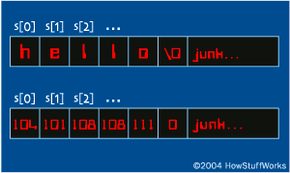
A string in C is just char str[100]. That looks like space for 100 characters. It isn’t. It’s space for 99 characters plus a terminator. C uses null-terminated strings. Every string ends with the ASCII value 0. Written as '\0'.
This changes everything.
Other languages handle strings differently. Pascal uses a length byte. It knows exactly how many characters are stored. Ask for the length? It returns that byte. Instantly.
C has to count. It reads until it hits '\0'. This makes C slower in some cases. Faster in others. It depends on what you’re doing.
There is no built-in string support in C. You rely on libraries. gets and puts.
That’s it. You copy element by element. Or you use strcpy. The library function does the heavy lifting.
strcpy is everywhere in C. It initializes strings. It copies data.
After this runs, s1 holds “hello” and s2 holds “hello”. The array stores ASCII values. Integers. h is 104. e is 101. C thinks in bytes. You think in text. The machine doesn’t care.
Comparison uses strcmp. It returns an integer.
Zero means equal. Negative means the first string is less. Positive means it’s greater.
Other functions exist. strlen returns length. strcat concatenates. Read the man page if you need more.
But how do these functions actually work under the hood? Let’s look at strlen.
A naive approach looks like this:
Most C programmers hate this. It seems inefficient. They prefer pointers.
You can compress it further.
A true expert could probably make it shorter.
I compiled these on a MicroVAX with gcc. No optimization. Ran each 20,000 times on a 120-character string.
First version: 12.3 seconds.
Second version: 12.3 seconds.
Third version: 12.9 seconds.
Pointers don’t always win.
Write code that you understand. Readability matters more than a few microseconds. Unless you’re in a tight loop. Then maybe optimize.
strcpy follows a similar evolution.
Start with the obvious:
Notice the <=. It copies the '\0'. If you skip it, the string has no end. Unknown length. Bugs later. Hard to find.
This version is inefficient. strlen runs every iteration. Call it once.
Now pointers.
Compress it.
Clean. Fast. Dangerous if you don’t check bounds.
That’s how C strings work. No magic. Just memory and pointers. And a lot of careful counting.
Pointers vs. Performance in strcpy
You could technically write while (s1++ = s2++); to handle string copying. The performance gap between naive implementations and optimized ones is staggering.
Take strcpy. The first version takes 415 seconds to copy a 120-character string 10,000 times. The second version? 14.5 seconds. The third drops to 9.8 seconds. The fourth settles at 10.3 seconds.
That is not a marginal difference. It is a massive boost. Pointers provide the speed here because they avoid unnecessary overhead.
Return Types and String Pointers
The prototype for strcpy in the string library reveals its intent:
Most string functions return a pointer to a string. strcpy returns the value of s1 as its result. This allows for chaining operations or immediate use of the copied string without a second lookup.
Removing Leading Blanks Without Moving Data
Using pointers with strings often results in definite improvements in speed. You can take advantage of these if you think about them a little.
Suppose you want to remove leading blanks from a string. The instinct is to shift characters over, overwriting the blanks. In C, you can avoid the movement altogether.
This is much faster than the movement technique. Especially for long strings. You are not shifting bytes. You are just changing the starting pointer. The data stays put. The output changes.
Picking Up Tricks
You will pick up many other tricks with strings as you go along. You will read other code. You will see how others handle memory.
Practice is the key. There is no shortcut for reading code. You just have to look at how it is done and understand why it works. The performance gains are real. The learning curve is steep. But the results speak for themselves.