
You snap a photo of your dinner. You hit Check In. You organize your albums. Your life is an open book. Then, in January 2012, the layout broke. Not because it stopped working, but because it started telling a story you didn’t ask for.
That was the launch of Facebook Timeline. It replaced the old, blog-style feed where the latest post sat at the top and older ones faded below. The new format felt different. More like a magazine. It clustered photos, posts, and comments by time and context, trying to weave your scattered digital life into a coherent narrative. It wanted to show who you were, or who you had been, at specific moments.
At first, it seemed optional. Facebook asked if you wanted to switch. Most people did, eventually. The transition wasn’t instant, but the pressure to adopt the new format was real. Rumors of it becoming mandatory spread quickly. The backlash was immediate. People hated the visual change. They hated the loss of the static feel. But the real issue wasn’t the look. It was the exposure.
Why Facebook Timeline forced a privacy reckoning
The new layout changed the stakes. You could no longer ignore your past.
In the old system, old posts drifted away. In Timeline, they stayed. They got sorted. They got displayed. A photo from three years ago could pop up on the front page of your profile, visible to anyone you were connected with. This made tagging a serious risk. One wrong tag from a friend, and an embarrassing moment from high school or a bad date becomes part of your permanent digital record.
You had to look at your history. Not just your friends’ walls, but your own. The Facebook profile became the central repository of your personal data. It was the first thing recruiters, parents, or potential clients saw. If you hadn’t curated it before, now you had to.
Think about your real life. You have conversations with friends you wouldn’t have with your boss. You have photos you’d share with close friends but not with your employer. Timeline blurred those lines. By default, it showed too much. The onus shifted entirely to you to separate the public you from the private you.
How to control what appears on your Facebook Timeline
You can’t delete the past, but you can hide it.
The key is individual post control. You can’t just rely on global settings anymore. You need to go through your photo albums, your old statuses, and your tagged images. For each one, you can change the audience. Set it to “Friends” or “Only Me” if it doesn’t fit the professional or public image you want.
It is tedious. It is necessary.
Don’t panic about what might appear. You know what you’ve posted. You know who tagged you. The work is just sorting it. Decide what stays. Decide what goes into the dark.
Your Timeline represents you. Make sure it’s the version you’re comfortable with.
This isn’t about hiding your life. It’s about controlling the narrative. You are the editor of your own history. If you don’t edit it, the default setting will do it for you, and the default setting is usually “show everyone.”
Stay vigilant. Check your tagged photos. Review your old statuses. The layout changed, but the responsibility didn’t. It just got louder.
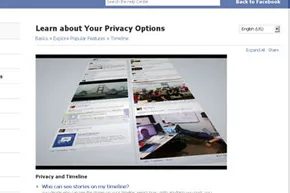
Managing the flood of old posts and privacy leaks
You can hide or delete specific posts and pictures from Timeline with a single click, even on a phone or tablet. A menu pops up with those options. But for power users with years of activity, doing this one by one is a nightmare. It is prohibitively time-consuming.
If you are unsure what personal or private information is exposed, dig into your account’s privacy settings. Facebook has always provided these controls. Over time, the options have become more sophisticated. Yet many users never learned the basics.
Sort your connections. Put friends, family, and business associates into separate groups. This ensures closer acquaintances see personal or recreational posts. A more formal profile remains visible to potential employers or casual acquaintances. You can define these settings on individual posts and tagged photos. Or change the overall settings with a single click.
Third-party apps are another vector for data leaks. You are in control of how they publish information. Read the small print when you click on a third-party app. This ensures you are not sharing details you want to keep private. Timeline integrates services like Spotify, Hulu, and Netflix to share music, TV, and movies. If you do not want that broadcast, adjust the privacy settings for that specific app.
How Timeline reshapes business pages and advertising
Social networks often collapse under the weight of spam and free advertising. MySpace survives, for now, by serving small bands and individual musicians. That strategy would not work for Facebook.
Before Timeline, businesses established a presence with minimal effort. They used the “Like” button and other features to build relationships. But Facebook needs money from advertisers to keep services free. Timeline changes that operation, though it may not be immediately apparent. It forces businesses to establish a presence in a more official way.
Timeline cover photos cannot contain certain sales language or “Like” gates. The focus for business Timelines mirrors that of individual users: an ongoing story. It shows what the business is doing, where they are now, and where they have been.
The era of free, easy click traffic is over. Facebook’s new strategy helps businesses do what they claim to do: build relationships with consumers. It moves beyond simple advertising under the guise of social networking. Exploring a company’s images, successes, and history promotes social interaction. It feels like meeting a new colleague. This makes more money for Facebook, which has defined traffic and click-through rules to reclaim revenue previously generated free for these businesses.
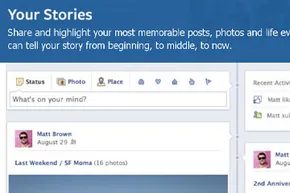
Reframing your Facebook Timeline as a curated magazine
Think of your profile not as a messy diary or a digital scrapbook, but as a dedicated website about you. When you shift that mental model, customizing the flow of information becomes less about archiving and more about curation. You are essentially constructing a narrative through photos, status updates, music playlists, and TV shows. This approach allows you to tailor what specific audiences see. You stop dumping everything and start highlighting what matters to your friends, their interests, and their attention spans.
How to backdate posts and manage Life Events
You have more control over the chronology than you did before. Timeline introduces a specific feature for backdating items, which is useful if you have old photos or memories that don’t fit the current date.
To use it:
1. Hover over a post.
2. Click the pencil icon to edit.
3. Select the clock icon.
4. Reset the position to an earlier or later date.
This is handy for inserting vacation photos from years ago without disrupting your current feed. There is also a category called Life Events. This section handles major milestones like weddings and births. It acts as a structural anchor, helping you and your contacts distinguish between years and significant life changes.
Why privacy settings feel overwhelming (and what to do about it)
The anxiety around privacy is real. The fine-tuned settings can feel paralyzing. If you are paranoid about how Facebook uses your data, you have two main paths.
First, you can delete your profile and start over. A bare-bones account means you only post what you are comfortable sharing. It is a clean slate.
Second, you can view the situation as an opportunity for transparency. Ask yourself: Is there anything truly damaging on your Timeline? Are there friends you cannot trust? If the answer is no, your privacy problem might not be with Facebook itself, but with who you let into your life.
Should you treat all Facebook information as public?
It is natural to assume other people’s profiles are public, but our own data feels different. It gets fuzzy. When posting, think about your reputation. You are crafting a representation of yourself.
Critics often argue that Facebook’s pattern of rolling out “optional” features that eventually become mandatory is cruel or a bait-and-switch. But consider the “optional” period as a beta test. If nobody had signed up for Timeline, or if reviews were uniformly terrible, the feature likely wouldn’t exist today. The wave-based rollout allows for feedback and adjustment.
Living in the digital age means accepting that nothing is ever truly lost. If you do not want something posted, do not post it. There is a simple rule here: never write down what you can say aloud, and never say out loud what you can communicate with a look. The web operates on the same logic. Your presence is a choice, and your control over it is absolute.