News cycles move fast now. Often, the first tip comes from a personal site. A blogger spots an angle that big outlets missed. Magazines cite them constantly. The news ecosystem leans on them.
Yet many people still don’t understand what a blog actually is. Or they’ve heard the term “blogosphere” and feel left out. There are millions of them out there now. Where did this explosion come from?
The real magic of blogs lies in their sheer simplicity.
Think about a “normal” website. CNN.com is a standard example. It has a homepage. That page links to big categories. Inside those categories are thousands of articles. It works like an electronic encyclopedia. A small business site might have a homepage and ten sub-pages. It acts like an online brochure. These structures require planning. They require hierarchy.
A blog doesn’t.
A blog is stripped down. It’s usually just one page. Sure, there are archives. You can dig back years. But the main page is all anyone cares about. It updates constantly.
Here is how it works:
- The entries appear in reverse-chronological order. Newest posts sit at the top. Oldest ones sink down.
- The content is public. Anyone on the internet can read it. No password wall.
- It’s typically driven by a single author. One voice. One perspective.
- The writing is stream-of-consciousness. No strict outline. If you find a cool link, you drop it in. If you have a thought, you write it.
The tools make this incredibly easy. You can publish anything, anytime. No coding knowledge needed. No editors approving every word. Just you and the web.
This freedom is what drew millions of people in. It turned passive browsing into active publishing. You’re not just reading content. You’re creating it.
In this series, we’ll show you how to jump in. You’ll learn the basics. You’ll build your own space on the web. And then you’ll send it out into the world.
Blogging Basics
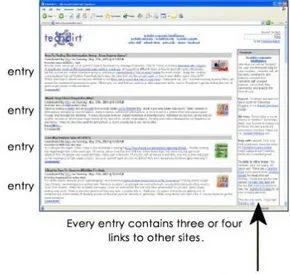

Most blogs follow a predictable structure. You land on a main page. It holds a feed of entries. Each entry is a short text blurb. It might include links to news stories or other sites. When the author publishes a new post, it sits at the top. Older entries get pushed down. A sidebar on the right stays permanent. It links to other sites or stories. The author updates this sidebar weekly or monthly.
Basically, a blog is an online journal. Or a diary. The author writes about anything. Many posts are just links to interesting finds. Some entries are snippets of information. The blogger thought them worth sharing.
Not all blogs are free-form. Many have a tight focus. A tech blogger might attend the Consumer Electronics Show. They post entries about what they see there. A health blogger might track a specific disease. They share every news article and research paper they find. An economics blogger links to articles. Then adds commentary.
Some people use blogs as a scrapbook. It is an online memory. When the author finds a link or snippet worth remembering, they post it. No one else needs to read it. It is still useful. The blog is a searchable electronic medium. The author can access it with a Web browser from anywhere in the world.
So, a blog can be anything the author wants. The one common thread is reverse-chronological ordering. New stuff always goes first.
The Interlinked Blogosphere
The fascinating part of blogging is the interlinking. Millions of people keep active blogs. Bloggers read other blogs. They see something they like. They link to it. They comment on it.
This tight interlinking created the blogosphere. The blogosphere is all the cross-linked blogs. You arrive at one blog. It has links to many others in the blogosphere. You can bounce around for years. If you like that sort of thing.
Readers enter the blogosphere. They find one or a few bloggers they like. You might have one blog for tech updates. Another for general news. The blogger acts like a DJ. They choose stories and links. Just like a DJ picks songs. People who like the focus come back daily. Celebrities got into the act too. They create blogs to interact with fans.
See how to create your own blog next.
Best Blogs to Read Now
If you want to get a taste of blogging, look at the best blogs out there. The easiest way is to find a “best of the blogs” list. Surf to a few real blogs. Here are several lists to get you started:
-
Forbes.com: Blogs That Matter
-
Guardian Unlimited: The Weblog Guide
-
Globe of Blogs
-
Webby Awards: Best Blog & Nominees
Read More
Blogging Basics: Tools and Infrastructure
You don’t need a computer science degree to start a blog anymore. The barrier to entry has collapsed. Web-based toolsets have simplified management to the point where it is barely friction at all. Services like Blogger, Xanga, TypePad, and LiveJournal offer free tiers that handle the heavy lifting. You can create a basic site in minutes. If you want more control, paid upgrades unlock additional features. For those who prefer self-hosting, software like Movable Type offers deeper customization. It is not just about posting text. It is about infrastructure.
I used Blogger to create Marshall Brain’s Blog. The process was fast. Five minutes is all it takes if you are efficient. You enter your name, email, and a few other details. Then you pick a template. The “look” is standard but functional. Click a few buttons. You are done. The interface is deceptively simple.
Adding entries follows a linear path. Type the content. Hit “post” to save it to your draft. You can edit as much as you want. Click “edit” again. When it is ready, hit “publish.” That makes it visible to the public. The workflow is linear. No complex database queries needed.
Take ExploreMarsNow.com as an example. I added an entry for it in ten seconds. The text was sparse: “I really like this Web site: ExploreMarsNow.” It sounds trivial. But that is the power of the medium. A blog entry can be that simple. Or it can be a long-form essay. The format adapts to your needs.
Hosting Options: Platform vs. Self-Hosted
With Blogger, you have two distinct paths for where your content lives. This choice defines your technical footprint.
-
Hosted on Blogspot.com : You create a custom URL under the Blogger domain. Blogger handles all hosting duties. For instance, Marshall Brain’s Blog resides at
http://MarshallBrain.Blogspot.com. You get convenience. You lose some control over the domain structure and server environment. -
Self-Hosted via FTP : You choose another website to host your blog. Every time you publish, Blogger uses FTP (File Transfer Protocol) to send the latest HTML code to your chosen location. You manage the server. You manage the security. You manage the uptime.
The simplicity of this setup is why blogging remained popular for so long. But text alone is limiting. Most modern toolsets support multimedia. You can post photos. You can embed video. You can upload audio files. Some platforms even allow posting directly from a cell phone. The constraints of early internet days are gone.
The Open Source Foundation
LiveJournal is built on open source software. This is a critical distinction for technical readers. It means the core code is available for anyone to modify and use. The architecture is transparent. This openness spawned several derivative blog toolsets. GreatestJournal and DeadJournal both utilize LiveJournal’s source code. They inherit the functionality but may differ in branding or minor features.
Understanding the Mechanics
What is a blog and how does it work?
A blog is a website or a section of one. It is usually maintained by an individual or small group. Entries are posted regularly. They contain commentary, event descriptions, or media like graphics and videos. The reverse-chronological order ensures new content appears at the top.
How do bloggers get paid?
Monetization is not automatic. It requires strategy. Common methods include affiliate marketing, where you earn commissions on referrals. Advertising networks place banners on your site. You can also sell your own products or services directly to readers.
What is the main purpose of a blog?
The primary goal is to share information and thoughts. It is a broadcast medium. It connects the writer with an audience. The interaction is asynchronous. You post. They read. They comment. The cycle continues.
Further Resources
If you want to dig deeper, the following resources provide context.
Related Articles
– HSW Blogs
– How Facebook Works
– How MySpace Works
– How Web 2.0 Works
– How Web 3.0 Will Work
– How Web Pages Work
– How Newsgroups Work
– How Podcasting Works
– How do I create my own Web site?
Recommended Platforms
– Blogger
– LiveJournal
– Xanga
– TypePad
– Movable Type
– WordPress
The landscape keeps shifting. WordPress dominates the self-hosted space now. Blogger remains a quick entry point. LiveJournal faded but its code legacy persists. You have choices. Pick the one that fits your comfort level with technology. Start typing. The rest is just infrastructure.