The “infinite scroll” is not an accident; it is a carefully engineered loop designed to turn every spare moment into lost hours. What begins as a quick check for a notification often spirals into an hour of mindless scrolling, driven by an automatic reflex to reach for the device whenever boredom strikes.
This cycle is becoming a widespread psychological phenomenon. According to a 2024 Pew Research survey, the impact is stark: 72% of US teens report feeling “peaceful” when they don’t have their smartphone, while 44% experience anxiety when separated from them.
For many, the solution—switching to a basic “dumb phone”—is impractical. Modern life requires a smartphone for banking, navigation, and essential communication. However, you don’t necessarily need a new device to reclaim your focus. You can use your iPhone’s existing features to “dumb down” its interface, stripping away distractions while keeping its utility.
🛠 Strategy 1: Leveraging Built-in iOS Features
If your phone usage is manageable but distracting, you can use Apple’s native settings to create digital boundaries without losing functionality.
1. Customizing Focus Modes
Standard “Do Not Disturb” is often too blunt, blocking everything at once. Focus Mode allows for nuance. You can create specific profiles—such as “Work” or “Travel”—that only allow notifications from essential people and apps.
* Pro Tip: You can link specific Home Screens to these modes. For example, your “Work” Focus can hide all social media icons entirely, showing only productivity tools.
* How to set up: Go to Settings > Focus to create custom profiles and manage allowed contacts/apps.
2. Implementing Screen Time Limits
Willpower is often insufficient to fight app algorithms. Screen Time acts as a hard digital barrier.
* App Limits: You can set strict daily quotas (e.g., 45 minutes for Instagram). Once reached, the app locks.
* Downtime: This allows you to schedule “blackout periods” (like weekends or late nights) where only phone calls and essential apps are accessible.
* How to set up: Navigate to Settings > Screen Time to configure limits and schedules.
3. Using Assistive Access
Originally designed as an accessibility tool for users with cognitive disabilities, Assistive Access can be repurposed as a “radical” minimalist mode. It replaces the complex iOS interface with a high-contrast, simplified grid of large icons and text.
* The Trade-off: This mode significantly limits functionality, turning your iPhone into a very basic device. It is best for those seeking a total digital detox.
* How to set up: Go to Settings > Accessibility > Assistive Access.
📱 Strategy 2: The “Dumb Phone” App Approach
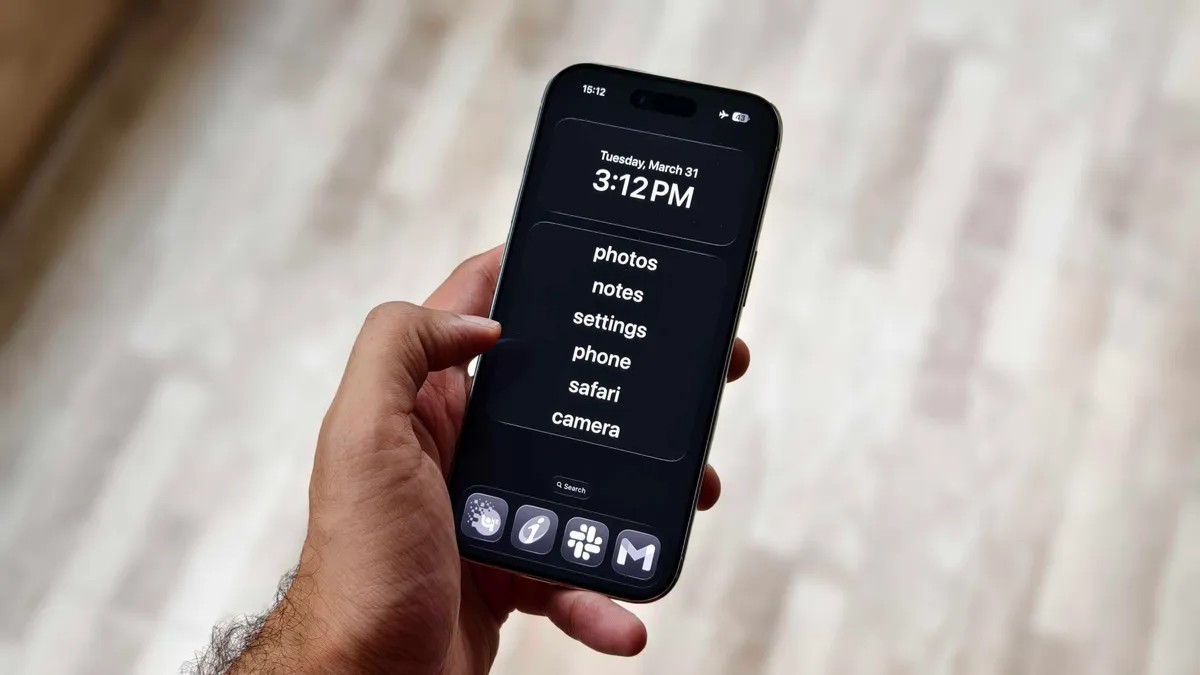
For those who want a more aesthetic, minimalist experience without the extreme limitations of Assistive Access, third-party tools like the Dumb Phone app offer a middle ground.
This app creates a text-based, minimalist launch menu, hiding the colorful, dopamine-triggering icons that invite mindless tapping.
The Setup Process:
To achieve a true minimalist look, the app suggests a specific configuration:
1. Minimalist Wallpaper: Use a plain black background to reduce visual stimulation.
2. Dark Mode: Set your display to Dark Mode via Settings > Display & Brightness.
3. Reduced Motion: Enable “Reduce Motion” in Accessibility to eliminate the flashy animations that make scrolling feel “rewarding.”
4. Detox Mode: Use the app’s “Detox Mode” to link with iOS Screen Time, creating a unified barrier against non-essential apps.
Note: While effective, this approach requires a small monthly or one-time fee, and it still requires the discipline to not simply swipe away from your custom settings.
Summary: Finding Your Digital Balance
Breaking smartphone addiction doesn’t require discarding your most important tool; it requires reclaiming control over its interface. Whether through native iOS settings or minimalist third-party apps, the goal is to break the muscle memory of mindless scrolling.
The takeaway: By intentionally simplifying your home screen and setting hard limits on notifications, you can transform your iPhone from a source of constant distraction back into a purposeful tool.