
Kartable has become a digital reference tool for French-speaking students, bridging the gap from elementary school to the last year of high school. It’s not just another app. This is a structured environment designed to reflect the official French National Curriculum. The goal is the same whether you use a web browser or the Android and iOS mobile apps. Its purpose is to help students master knowledge and prepare for exams effectively.
This platform aggregates thousands of resources. Detailed lessons, interactive exercises and summary sheets in one place. The pedagogical approach prioritize accessibility. The user interface is intuitive and the content is organized by school level, subject and chapter. This structure allows students to customize their learning path. Dive into specific topics, complete exercises with real-time corrected, and review core concepts with concise summaries.
Why Kartable is Works for students and parents
You don’t have to pay to get started. While a subscription unlocks advanced features, much of the content is available for free. This makes the tool relevant from the first login without forcing an immediate commitment to a paid plan.
Registration is easy. You can register with your email address or log in with your Google or Apple account. Once inside, you create a personal space. This dashboard tracks your progress and results in detail. It’s not just for studying alone. Parents and teachers also have specific access levels. They can monitor a child’s evolution or assist with lesson preparation. This collaborative layer encourages regular follow-up and helps students build autonomy in their work.
Accessing Kartable on any device
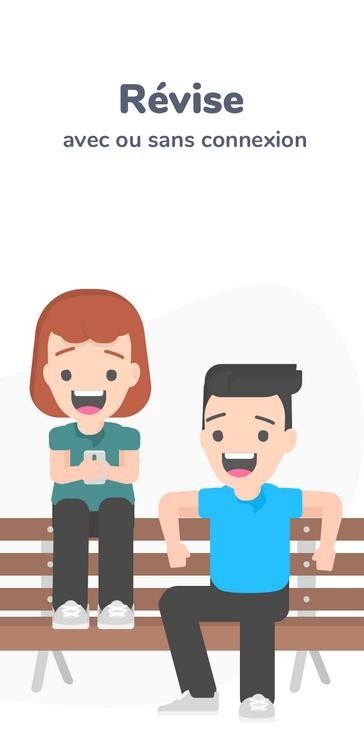
Mobile flexibility is a key feature. The apps is available for Android and iPhone/iPad. You can study anywhere and anytime. Some resources can also be downloaded for offline use, which is crucial when internet connection is spotty. The experience is consistent across all platforms, so the quality remains high regardless of whether you following a full curriculum or fill in gaps in your knowledge.
Installation and Compatibility Details
Installing the app depends on your device, but the process is standard. On Android, you can download it for free from the Google Play Store. Apple users can find it in the App Store. Mobile functionality is designed to reflect web service and ensure the pedagogical continuity. Basic features like reading and doing exercises work seamlessly after authentication.
If you prefer a computer, you don’t need to download any software. You can access the full service directly from the official website. It works on all modern browsers, including Windows, Mac and Linux. There is no separate executable installer for PC or Mac. The company chose a web-based service model. This ensures that content and features are updated automatically the content and functionality. There is no need for manual intervention as you always have the latest version available.
Updates and Security
Mobile applications are updated regularly. These patches bring new features, fix bugs and align with changes in the official school programs. You can set apps to update automatically or check manually within the app store. No need to worry about technical maintenance or compatibility. Each version is rigorously tested before release.
For web users, the Kartable team is improvements are deployed in real time. You get access to the latest content.
What about older versions? If you want an older interface or app version, you won’t find it in the official channels. This is intentional. The company prioritizes security, stability and adherence to the modern educational standards. The mobile application model focuses on current technology and data protection. In education, these are non-negotiable priorities.
The landscape of digital learning is changing rapidly. Platforms like Kartable are not just hosting files. They are creating ecosystems. The question is no longer whether students use digital tools, but how deeply those tools will integrate into their daily study habits. As the curriculum evolves, there is pressure on these platforms to keep pace without losing the human element of guidance.
Most edtech platforms force you to choose between the convenience of digital and the depth of traditional tutoring. Kartable refuses to make you pick. It sits somewhere in the middle, offering a generous freemium structure for those who want to do the heavy lifting themselves, while offering a sophisticated ad-free premium tier for families who want to outsource monitoring.
The premise is simple. You sign up. You get access to a significant chunk of the curriculum. This is not a small demo. This is real content. Students can read the course, complete exercises and check their understanding of individual chapters without a credit card number. This is important because it lowers barriers to entry. As educational resources are increasingly locked behind paywalls, Kartable offers a way to democratize access to high-quality educational materials. You don’t need a subscription to start improving. You just have to show up.
Advanced features and flexibility in licensing
If the free level is not enough, the platform switches to a subscription model. This is not a one-size-fits-all approach. Prices vary according to the student’s grade and the length of the studies. This flexibility is critical for families who only need support during a difficult semester rather than a year-long renovation.
Premium “Étudiant” or annual account unlocks the entire ecosystem. We are talking about:
- Unlimited practice: The free version has limitations. The premium version removes them.
- Detailed corrections: Understanding why you got the wrong answer is more important than just seeing the correct answer.
- Parental Controls: Dashboard for progress, time spent and difficulty areas.
- Offline access: Download content without an internet connection. Important when commuting or in areas where Wi-Fi is unstable.
- Exam Preparation Tools: Special modules designed for high-stakes tests.
There is no clutter. No ads. A clean user interface that focuses on learning.
Accessibility and technology integration
Kartable is not trying to replace schools. It doesn’t have a specific B2B offer for educational institutions or accredited teacher training modules. It is just a tool for independent work and supporting the family. This distinction is important. It positions Kartable as a supplement, not replace.
Technically, it is frictionless. No downloads are required to access the core content. It’s all in your browser. This limits technical problems for non-technical users. It works if you have a smartphone, tablet or old laptop. The platform adapts to the device. Not the other way around.
Support is available online. Need help with login problems? Compatibility issues? Tips for using the dashboard? Our team is ready to help. This reduces anxiety about new teaching aids.
How Kartable Compares to Maxicours and SchoolMouv
The French digital tutoring market is very crowded. Maxicours and SchoolMouv are famous. They usually focus on video lessons and personal support. Learning through digital lectures.
Kartable takes a different path. It prioritizes variety. Yes, not only lessons, but also quizzes, progressive exercises and a thematic dossiers. The user interface is clearer and you can move freely between all class levels. You are not tied to the linear progression of videos. You can jump around and find gaps and fill them.
This approach appeals to students who find long Video Lectures monotonous. It appeals to parents who want transparency. The content is created by active teachers and is guaranteed to be in line with the official curriculum. Always updated. This distinction is important for families looking for reliable, up-to-date resources that don’t look like corporate products.
Personalized learning and family involvement
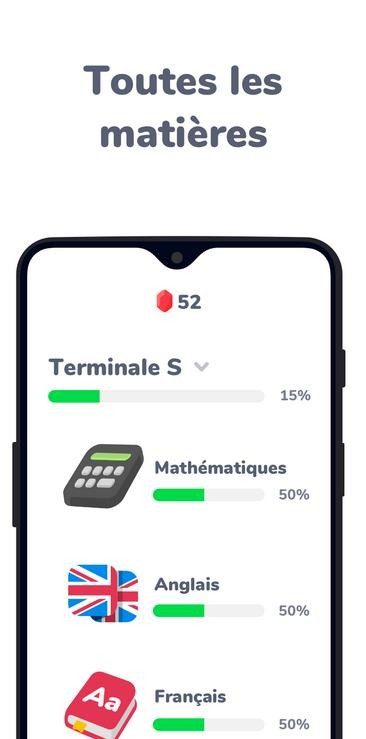
The real value of Kartable is its ability to adapt to different learning rates. Detailed chapter structure allows students to determine exactly where they stand. Are they strong in algebra but struggling with geometry? The platform highlights these differences. This allows students to focus their efforts on areas that are most needed.
Encourages autonomy. Self-correction exercises provide immediate feedback. This immediate loop builds confidence. You try, you see the result, you adjust. This is a low-pressure environment that reduces the fear of failure common in traditional homework.
For parents, the dashboard is a game changer. You can see which topics take the most time. You will receive a notification if you need help. It creates a collaborative environment. Instead of nagging your child to study, but we have the information. You can base your discussion on facts instead of emotions.
Mobile-First Design for inclusive education
Finally, there is the issue of access. Education should not depend on zip code or hardware. Kartable’s mobile-friendly design ensures this. The experience is consistent whether you have a high-end smartphone or an older tablet. This inclusivity is vital. This ensures that students in remote locations or with limited resources are not left behind.
This is a versatile reactive tool. It meets the challenges of modern education. From elementary school to entering university, it offers a structured yet flexible path to success. It doesn’t promise miracles. Provide tools. How you deal with them is up to you.
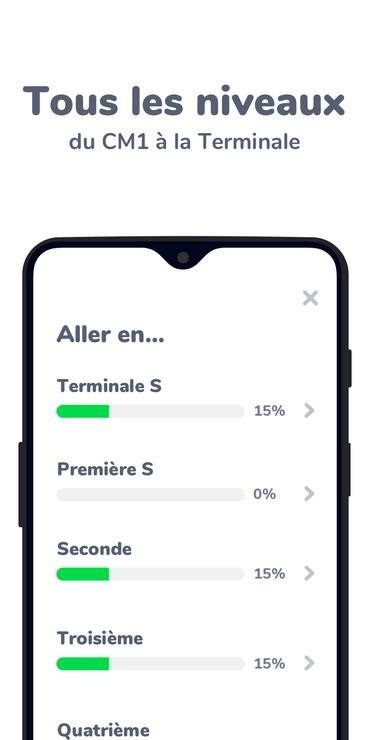
Kartable is more than just an app. This is a revision ecosystem that spans from CM1 to Terminale. If you’re wondering where to start, understanding the technical backbone can help. The platform operates as a web service. You can open it in a browser on your PC or Mac. No installation required. There are separate applications for mobile devices for Android and iOS. The real magic happens in sync. Your account saves your progress across devices. Start on your phone, finish on your laptop. The user interface logic remains unchanged.
How to access and install Kartable
You can start smoothly. No need to look for obscure installers. Distribution channels are standard. For mobile users, the app is available on Google Play Store and Apple App Store. These updates keep the mobile version up to date with iOS and Android changes. Just visit the official website on your desktop.
The entry point is a personal account. Sign up using email, Google or Apple ID. This creates a consistent profile. This is the key to syncing your data. Without this you can only display static pages. With it, you have a living record of what you’ve learned.
Internet connection for core experiences cannot be negotiated. Needed to sync progress, accessing corrections, and get the latest pedagogical updates. There is also an offline mode for mobile devices, but it has limitations. It all depends on the subscription level you choose. Most of the time it is online.
The Freemium Model Explained
Kartable uses a freemium license. This means that the basic level is free. Use large content databases. Courses. Revision sheets. Interactive exercises. It’s enough to get a feel for the platform. You don’t have to spend a single euro to download and try Kartable.
But what about the good stuff? It’s behind a paywall. Premium features require a subscription. We’re talking about extended offline access. Additional training. Detailed corrections. Advanced progress tracking for parents. The free version contains ads. They disappear with the paid plan.
Who is this for? Students from CM1 to Terminale. Designed for the French general track. Parents and teachers have tracking tools to monitor progress. This is a structured environment for organizing reviews.
User experience: what works and what doesn’t
Kartable reviews show that it’s a reliable (albeit somewhat rigid) revision tool. The organizational structure is clear. Levels, themes, concepts. Whether you’re online or on a mobile device, you can navigate easily. The content is structured. Lessons, synthesis sheets and real-time corrected exercises. This is a coherent package for Brevet or Baccalauréat preparation.
Dashboards are useful. It highlights gaps. It helps you prioritize what to study next. The user interface is very clean. Touch friendly. There are no special hardware requirements other than a modern device. Compatible browsers are Chrome, Firefox, Edge and Safari.
However, there are also limitations. Teaching methods are heavily based on text and interactive quizzes. This can be overwhelming when learning is enhanced through video and real-time interaction. It assumes a degree of autonomy. Middle school students may need supervision to use it effectively.
Mobile apps evolve with store updates. The user interface may change. They can disrupt your habits. On a desktop, the browser-based approach is convenient, but it lacks the feel of a dedicated client. Still, continuity between devices is still strong.
Who should download Kartable?
This platform is suitable for students who need a clear modular framework for revision throughout the year. Families appreciate tracking tools. These will help you develop sustainable work habits. The experience is consistent whether you’re using the Android, iOS, or web version.
Downloading Kartable is a low-risk way to test the platform. Use free content. Judge its relevance. Then decide if the subscription is worth it for your specific academic goals. The regular updates to the curriculum and consistency across devices make it a suitable partner for consolidating basic knowledge and for systematic preparation for assessment.
This is not a silver bullet. It alone does not solve bad study habits. But as a structured resource? The question is, do you need the depth offered by the paid plan or is the free base enough for your needs? The answer usually depends on how much pressure you’re under for exams.
This request cannot be completed because the text of the source article has not been submitted for rewriting. Paste the content of part 4 of the article. We create English language continuations according to strict style and SEO guidelines.