
John Warnock and Charles Geschke didn’t just build a company in 1982. They built the infrastructure for how we see information today. Adobe Systems. That’s the name attached to the Portable Document Format (PDF). It’s the standard for compact files, tiny enough to email but stable enough to print. Businesses rely on it to share docs without the formatting breaking. You use it to read articles or view photos. It’s basically an unlimited photocopier sitting on your hard drive. Then there’s the creative suite. Illustrator. Photoshop. InDesign. These tools let anyone, from pros to hobbyists, manipulate images and layouts. Without Photoshop? No LOLcats. The internet would be significantly less fun.
Adobe changed content creation. And now they want to change how that content lives online. The goal is simple. Make the desktop and the web feel like one place.
In early 2008, they pushed the 1.0 release of Adobe AIR. It’s a cross-operating system runtime. Developers use it to bundle HTML, Ajax, Flash, and Flex technologies. They can then deploy these as Rich Internet Applications (RIAs) directly to the desktop. Adobe is selling it to developers, businesses, and regular users. You can download it for free.
But what does it actually do? And why should you care?
How Rich Internet Applications Change Your Workflow
So, what is an RIA? It’s an application that looks and feels like desktop software but is built using web technologies. Traditional web apps are limited by your browser’s sandbox. They need a constant internet connection. They feel sluggish.
Adobe AIR removes those constraints. It lets developers package their web-based code into standalone applications. You install it. It launches independently. It doesn’t need Chrome or Firefox to run. It accesses your local files, your calendar, your contacts. It feels native.
Think about Adobe Bridge. Or even simple tools like the Adobe Reader extension. Before AIR, these were clunky plugins or limited web widgets. With AIR, they become proper applications. Faster. Smoother. Offline-capable.
This matters because the web was never designed for heavy lifting. It’s designed for documents and links. Now, with Adobe AIR, you can run complex, data-heavy apps without leaving your desktop environment. You get the reach of the web with the power of native software.
Why Developers Choose Adobe AIR
For the code-tweakers, the appeal is clear. You build once. You deploy everywhere. Windows. macOS. Linux. No need to write separate C++ or Java apps for each platform. You stick to HTML, CSS, and JavaScript.
And it’s not just about portability. It’s about access. AIR gives web apps access to the operating system’s features. File dialogs. System tray icons. Offline storage. This bridges the gap. You stop building “websites that act like apps” and start building “apps that live on the web.”
Businesses love it. They can push updates instantly. No more waiting for IT to install patches on every machine. Just update the server. Users get the new version the next time they launch the app.
What This Means for Everyday Users
You probably don’t care about the runtime architecture. You care about what runs on it.
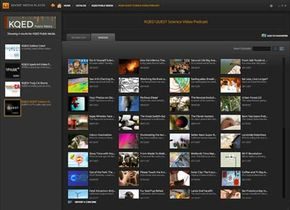
For
What AIR Actually Is Under the Hood
Before diving into the specifics of Adobe AIR, you need to strip away the marketing jargon and understand what a cross-operating system runtime actually means. At its core, Adobe AIR is a runtime engine. Think of it as a translator.
When you write code, you aren’t writing in machine language—the raw 0s and 1s that the CPU understands. You’re writing in high-level languages like HTML, XML, or JavaScript. The runtime engine takes that code and translates it into executable instructions. Without this layer, your computer is just a silent brick.
Consider Java. If an application is built on Java, it requires the Java Virtual Machine (JVM) installed. Without the JVM, the app doesn’t run. It’s the same logic here. Adobe AIR provides the infrastructure needed to render a graphical user interface (GUI) on your desktop. This isn’t just about windows and icons; it’s about the human-computer interface that lets you interact with software using a mouse or keyboard. In fact, your entire operating system is essentially a massive runtime engine, mediating between your hardware and every app you open.
Why “Cross-Operating System” Matters
When Adobe calls AIR a cross-platform solution, they mean it can ignore the underlying OS differences. A program running on macOS doesn’t need to be rewritten to look native on Windows XP. AIR handles the rendering.
This is where it diverges sharply from standard Flash Player. Flash Player lives inside the browser. It’s a plugin. Adobe AIR applications, however, live on the desktop. They don’t need Chrome or Firefox to function. Because AIR includes the open-source WebKit HTML renderer, it can display complex web content directly on your desktop environment. It bridges the gap between the sandboxed world of the browser and the native capabilities of the operating system.
Defining the RIA
You’ll often hear Adobe refer to Rich Internet Applications (RIAs). This is a broad term for web apps that feel like desktop software. They offer high interactivity and connectivity. Sites like Flickr or Google Maps are classic examples. They are engaging but notoriously difficult to program.
Adobe AIR was designed to smooth out this development process. It allows developers to take the best features of web-based interaction and package them into a standalone desktop experience. The goal? A user experience that feels native but retains the connectivity of the web.
Who Benefits from Adobe AIR?
Adobe positions the platform to serve three distinct groups: developers, businesses, and end users.
Developers gain a significant advantage. Because AIR supports HTML, XML, and JavaScript, they don’t need to learn a proprietary coding language. They can use familiar web technologies to build desktop applications. This lowers the barrier to entry. A developer who knows how to build a website can build a desktop app with minimal friction.
Businesses use AIR to deepen user engagement. When a user can download an app directly to their desktop without opening a browser, they are more likely to keep it running. Continuous engagement beats the ephemeral nature of a browser tab.
End users get applications that are easier to access and more responsive. Once AIR is installed, these apps are just one click away. They feel less like visiting a website and more like launching software.
Real-World Application: eBay Desktop
Don’t take Adobe’s word for it. Look at eBay. They released an eBay Desktop application built on Adobe AIR.
Why? Because checking auctions in a browser is clunky. You have to constantly refresh or log in. The eBay Desktop app runs independently. It provides continuous updates on items you are bidding on. It removes the friction of the browser entirely. This is the promise of AIR: taking a web-based workflow and optimizing it for the desktop environment.
Is It Still Relevant?
The landscape has shifted. While some developers still maintain Adobe AIR projects, the technology has largely been superseded by modern frameworks and native app development methods.
If you are asking whether you need it today, the answer is generally no. It is not required on modern macOS systems. Many of its use cases have been absorbed by Electron-based apps or native iOS/Android development tools. It worked. It solved a specific problem in the mid-2000s and early 2010s. But the web and desktops have merged in ways that didn’t require a separate runtime layer.
“Adobe AIR was a bridge. It let web developers build desktop apps without learning native code. That bridge has mostly been rebuilt.”
The technology isn’t dead, but it isn’t the default choice anymore. For most users, the need to install it is gone. For developers, it’s a legacy tool. The web moved on.
The Legacy of Adobe AIR and the Web’s Evolution
The landscape of web development has shifted dramatically since those early experiments. What started as a curiosity—bridging the gap between the browser and the desktop—has evolved into something much more mundane, yet equally pervasive. We no longer need a dedicated runtime environment like Adobe AIR to run rich internet applications. The browser itself has become the platform.
But looking back at the era when AIR promised to bring desktop-grade power to web technologies reveals why the current stack matters. It wasn’t just about nostalgia. It was about solving a specific friction point: offline access.
Bridging the Gap Before PWA Dominated
Back in 2007 and 2008, the web was online-first. If your connection dropped, your application stopped working. Adobe AIR changed that by allowing developers to package HTML, JavaScript, and CSS into standalone applications that could store data locally. It offered a taste of the software of the future, where your web app lived on your desktop and worked without a signal.
“Adobe AIR gives web and desktop development a breath of fresh air.”
This wasn’t just a gimmick. It addressed the limitations of the standard EULA and the walled gardens of desktop software. It allowed developers to bypass the constraints of browser sandboxes while still using web standards. For users, it meant applications that felt native but were built with web technologies.
Why the Shift Happened
The rise of Progressive Web Apps (PWAs) and improved browser APIs effectively made AIR redundant. Browsers gained service workers, cache storage, and manifest files. They could do offline caching, push notifications, and even install to the desktop without a separate runtime. Adobe eventually shifted its focus, acknowledging that the web platform was catching up.
The sources from that period, like Jacqui Cheng’s coverage in Ars Technica or Ryan Paul’s first looks, highlight a transitional phase. They captured the excitement of a technology that promised to unify web and desktop development. Yet, they also hinted at the challenges: security concerns, installation friction, and the eventual obsolescence of the runtime itself.
What We Learned
The lesson from the AIR era is clear: platforms converge. When one platform lacks a feature, another adopts it. The distinction between “web app” and “desktop app” is increasingly blurred. Users expect their web tools to work offline, sync across devices, and feel responsive. Developers expect a single codebase to reach multiple screens.
The specific links to How Semantic Web Works and How Internet Infrastructure Works from that time remind us that the foundation of these applications is complex. It’s not just about the UI. It’s about how data moves, how pages render, and how security protocols evolve.
Today, when we build for the web, we’re building for a device-agnostic future. The runtime is the browser. The API is the operating system. The challenge isn’t bridging the gap anymore. It’s optimizing for performance, accessibility, and privacy in an environment that’s always connected.
The tools change. The intent remains: give users powerful, seamless experiences. Whether it’s through a standalone executable or a URL in a tab, the goal is the same. We just got better at hiding the machinery.