
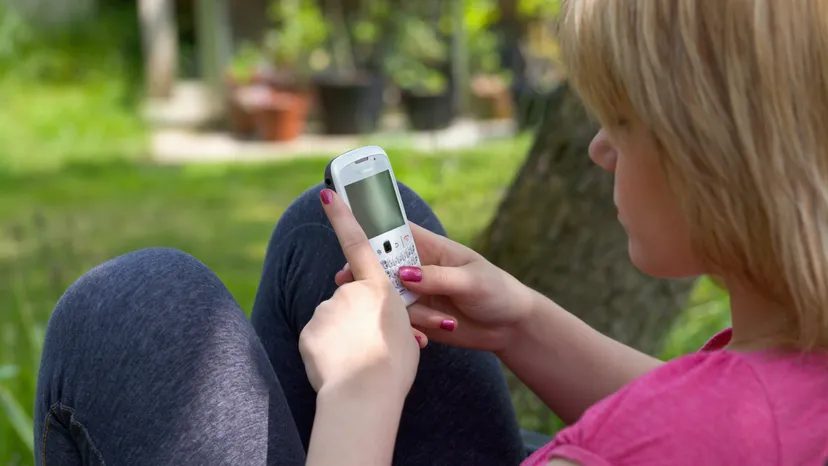
Back in 1999, BlackBerry wasn’t just a phone. It was a status symbol. Carrying it around meant you were an influential leader or a person who always had to know everything. You need to be constantly connected to email, calendar and phone calls. Research in Motion (RIM) started small. There were only 25,000 subscribers in the first year. After that, the number grew exponentially.
As of September 2005, RIM had 3.65 million active users. People didn’t just like these devices. They become addicted to them. Language itself often adapts to this behavior. By sending messages through this device, we are being “bullied”. We get “BlackBerry thumb” due to fatigue from repetitive strain. We have even become “drunk-Berrying” when we have made the wrong decision while tapping with the device while drunk.
The cultural impact is twofold. Some users claim that they can escape from the office and get a new life. Others believe that e-mail intruding on private life endangers work-life balance.
To understand why this particular device causes such reactions, we need to look at its internal structure. In particular, the push technology that makes BlackBerry essential must be understood. We also look at the patent dispute between RIM and NTP Incorporated and Visto Corporation, as well as the hardware mechanisms that support RIM’s operations.
Sync failed
Personal Digital Assistant (PDA) has been in use since before Blackberry. They can do many of the same things. But they have a fatal flaw. Syncing your PDA with your computer can be a pain.
You need to synchronize manually. Or wait for automatic synchronization, which often fails. This process is very time-consuming. This is also very uncomfortable. Worse, it caused conflict. Imagine a leader planning a meeting on the PDA. Unbeknownst to them, their assistant had just booked the same time on her online calendar. Synchronization will eventually detect this, but it will not be able to prevent double-booking in time.
BlackBerry solved this problem by eliminating the sync step altogether. It used push technology to keep your information up to date.
RIM’s BlackBerry Enterprise Server (or Desktop Redirector software) acts as an intermediary. It doesn’t wait for you to ask for information. Push new emails, calendar updates and documents directly to your handheld via the Internet or mobile phone network.
The mechanism is as follows. First, the software detects the change. A new message has arrived. Calendar entry changed. The server then compresses the data. It packages it securely. The information is directed to your device.
Communication is based on standard Internet protocols. The server communicates with the handheld using HTTP (Hypertext Transfer Protocol) and Transmission Control Protocol (TCP). Information security was non-negotiable for business customers. The server encrypts your data using Triple DES or AES encryption standards.
Customizing the Flow
The software does more than just transfer data. Check the features of your BlackBerry model. This allows you to set standards for content delivery.
You can filter by message type. You can set size limits. You can whitelist specific senders. You can only update certain programs or databases.
Once these parameters are set, the software enters monitoring mode. It’s waiting for an update. When new content appears, the software formats it to fit the screen. Pack emails in “e-envelopes”. This allows you to preview the sender and subject without having to download the entire body of the message. You decide if it’s worth opening.
BlackBerry itself is passive in this exchange. It doesn’t poll the server and ask, “Do you have anything?” This wastes battery and bandwidth. Wait for a push notification instead. It reminds you.
Alerts are usually vibrations. The display icon may change. The indicator light may flash.
A copy of the e-mail remains in your computer mailbox. But when you open a message on BlackBerry, the system will intelligently mark the message as read. This keeps the desktop in sync without touching the cables.
This constant, frictionless flow of information makes users addicted. It’s not just a phone. It’s a constant, real-time connection to your work life.
Road to war
This technique worked so well that it became a target. RIM’s success brought legal challenges. Next, we look at these patent disputes. But first, consider the scale of the adoption.
In the US, 70% of BlackBerry users are Americans. This device is more than just a global curiosity. This is a national phenomenon that is shaping the way Americans work.
Wireless e-mail price
Patent law is rarely simple. Claims made in disputes concerning intellectual property rights are often vague, difficult to measure and easy to interpret. But the core problem with RIM and its BlackBerry devices is serious. NTP Incorporated owns several patents related to wireless email technology. RIM’s push technology is similar to NTP’s own system, but is much more complex. NTP accuses RIM of infringement. The judge and jury agreed.
This lawsuit, combined with the delay in the launch of new BlackBerry phones, somewhat slowed RIM’s rapid growth.
The dispute began in 2001 when NTP sued RIM. Courts have consistently ruled in favor of NTP, ordered financial settlements and issued injunctions against RIM. RIM appealed. It also requested an examination of NTP’s patents. During this time, the United States Patent and Trademark Office (USPTO) invalidated several controversial patents.
In November 2005, a US district judge declared an earlier financial settlement between the companies unenforceable. On January 23, 2006, the United States Supreme Court refused to consider the district court’s decision. The real concern is a ban that would stop BlackBerry sales and services in the US. The US Department of Justice requested a 90-day moratorium to protect critical government workers who rely on these devices.
RIM proposed a software workaround to avoid infringing NTP’s patents. The companies started negotiations through a court-appointed mediator.
They settled. The price is 612.5 million dollars. Result: NTP licensed its patents to RIM. The press release published by both companies on March 3, 2006 describes the agreement.
“The license and settlement agreement applies to all patents owned and controlled by NTP and covers all RIM products, services and technologies. NTP grants RIM an unfettered right to continue its operations, including the BlackBerry® business. With this decision, RIM and its partners agree that as long as RIM’s products and services are used without the freedom provided by RIM to sell RIM’s products and services.
Next, let’s look at the hardware and software behind the device.
The coming patent wars
The RIM vs. NTP battle raises practical questions. Why aren’t other smartphone manufacturers using push technology suing? Some companies have licenses from NTP to use this proprietary technology. Other companies use technology that does not conflict with NTP’s patents. Regardless of whether the ban shuts down RIM’s U.S. operations, more companies are preparing to launch PDAs and smartphones with push email and data capabilities. Constant use of e-mail and an up-to-date calendar are becoming as standard as owning a mobile phone.
BlackBerry hardware
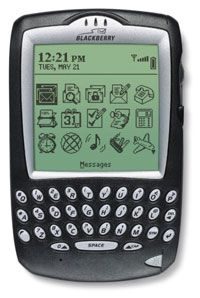

BlackBerry is more than just a phone. It’s a hybrid that combines all the functions of a PDA, an e-mail program and a two-way pager. Of course, it handles text messages like any mobile device. However, it can also be used for calendar management, web browsing and as a portable organizer. Real magic? Does not require a Wi-Fi hotspot to function. It used cellular networks* and supported * 802.11b WLAN, offering flexibility unmatched by pure PDAs of the time.
Physical design and input method
Some models look and feel similar to early smartphones. Others look more like chunky handheld computers. Although certain components vary from model to model, the overall structure remains consistent. You always have:
- LCD screen : The window where you enter the operating system.
- QWERTY keyboard : The defining feature. It’s not a trackpad or a touch screen for writing emails. Actual keys.
- Click Wheel : Use to move through the menus without fumbling for a stylus.
- Function keys : On/off, exit and navigation controls.
- Headset connection : For private calls or voice commands.
- USB Port : For charging and data sync.
- Antenna : Usually hidden inside the case to maintain a sleek profile.
- Indicator : A small LED light that lights up to warn of new messages or data bursts.
The places for microphones and speakers are also on the outside. Of course, there’s also a place to slide the back cover to access the rechargeable lithium-ion battery.
Inside the case
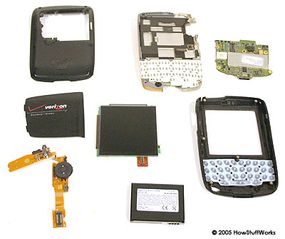
Removing the case reveals a printed circuit board (PCB) that contains the entire operation of the device. This is not just a mobile phone motherboard, but a compact data center at that time. The main internal components are:
- Backlight : illuminates the LCD screen in dimly lit environments.
- 32-bit microprocessor : The brain that runs the BlackBerry operating system.
- Memory : Combination of Flash memory for files and RAM memory for active processes.
- Bluetooth Transmitter : Available in select models on some models.
- Wireless Modem : Enabling the cellular connectivity that makes it all possible.
BlackBerry succeeded because it combined the 24/7 connectivity of a mobile phone with the productivity tools of a PDA without Wi-Fi.
This hardware configuration allows you to send emails in real time. You don’t have to “send and receive” like on a Palm Pilot or early smart phones. The device waits for a signal and waits there before delivering the message.
The difference in concerns is clear. Telephone networks process voice and data. If a Wi-Fi module is available, it will do the heavy lifting for you. But the core experience — receiving an instant message from your boss at 10 p.m. — relies on your cellular connection. It’s always on. Always be prepared.
Has anyone else built something similar? Not really. Palm has a Treo that is pretty close. But BlackBerry takes an almost obsessive approach to corporate email workflows. The hardware reflects this. There are no distractions. Just keys, a scroll wheel and a screen that shows important information.
Apparently the battery life has shortened. Lithium-ion batteries degrade. carrying a separate

How BlackBerry Click works
Most early PDAs relied on touchscreens for input. BlackBerry chose another path. It has a physical keyboard designed for thumb typing. This setting mimics the feel of a regular computer keyboard. But the design behind it is completely different.
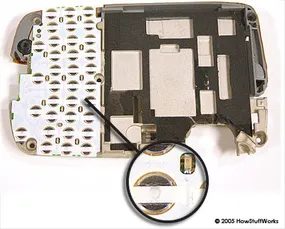
A typical computer keyboard uses a dome switch. Each key is located directly above the switch. Press to activate the switch. The BlackBerry layout changes this geometry. Between the rows of keys is a row of domed switches. Each key cover has an actuator that depresses one or more adjacent switches. This design allows for tactile feedback while maintaining a slim profile.
The biggest difference is the actuator. Keys are more than just presses. These bridge gaps and trigger multiple switches.

The BlackBerry keyboard and how typing works
The hardware behind the BlackBerry input experience is based on lookup tables. The system matches each character on the screen to a specific combination of dome switches below the keys. result? By requiring fewer physical switches, engineers can reduce the size of the keyboard while maintaining functionality.
Later models faced more severe restrictions. Space is even more limited, so one key must cover several characters. To solve this problem, BlackBerry released a predictive text software called SureType. Users can type naturally without having to search for specific combinations of characters. The software interprets your input in real time and guesses the word you want as you type. For those looking for precision, the multi-tap method of the keys is exactly the same as the multi-tap method used on standard phones.
Different landscapes
BlackBerry wasn’t the only early mover in wireless email. Users have the following options:
- Palm Treo
- T-Mobile Sidekick/Danger Hiptop
- Windows Mobile Pocket PC
Services such as Visto and Intellisync also offer cross-platform push email.
So why isn’t market segmentation around these options? Lock-in played a big role. Many users are already rooted in the BlackBerry ecosystem. In addition, the popularity of the device has created a strong market for third-party applications. Companies rely on special applications that are not available on other platforms. Switching means losing access to important workflows.
The software stack that controls the device
Push technology is its biggest feature, but it’s actually a complex network. Using BlackBerry requires software to be installed on handhelds, desktops and servers. The device itself has its own operating system with e-mail, web browsing, instant messaging and personal information management (PIM) tools.
Developers have built a huge library of third-party programs. These range from casual games to productivity suites. However, the most valuable tools are often the tools built for specific businesses. These applications pulled data from proprietary sales or data collection systems. This often involves a browser interface or a link embedded in an email. Clicking a link to start a call, view real-time data, or log the user into internal services. Security is managed with SSL and TLS encryption.
Resource constraints are a constant factor. BlackBerry hardware has less memory and processing power than desktop computers. The software must be streamlined and efficient. Web pages cannot rely on heavy frameworks or Java applets. Minimal color scheme improves performance. Developers simulate the device using the Java environment and ensure that their code does not crash on low-end hardware.
Business and personal management
For large organizations, BlackBerry Enterprise Server is the backbone. It manages the connection between the phone and the company network and works behind the company’s firewall. System administrators can push updates wirelessly updates to hundreds of devices simultaneously.
For individual users, there is an easy alternative: BlackBerry Desktop Redirector. This software mirrors the capabilities of an enterprise server, but on a single machine scale. It broke data into smaller chunks to avoid overloading your home internet connection and stopped unnecessary data from cluttering your phone. A key limitation? Your computer must be on and running for synchronization to occur.
Reliability in Crisis
BlackBerry’s reputation for reliability was strengthened during the September 11 attacks. BlackBerry users stayed connected when New York’s mobile networks collapsed under the pressure of desperate callers. At that time, the device used a private network that was separate from the congested public cell towers. Police, firefighters, first responders, and other emergency services flocked to the device.
Today, this distinction has almost disappeared. Most modern BlackBerry devices and smartphones share the same public network with other devices. However, you still need a data-based service plan to use the core features. The era of private networks is over, but the expectation of an always-on connection remains.
A deep dive into BlackBerry’s legal and technical battles
BlackBerry’s story isn’t just about devices or phones. This was a patent battle that nearly shut down entire services to federal workers and businesses. To understand why keyboard layouts can cause legal nightmares, you need to look at the documented sources of confusion.
Legal dispute
At the heart of the dispute are NTP’s patents. This decision is not just for RIM. It forced the tech industry to do massive reckoning. Illinois Judge James Holderman, who is handling the case, said the situation is complicated. He blocked the service at first, but soon caused a panic. The Ministry of Justice was also involved. They believe that cutting off communications of federal employees is a national security risk.
“Government intervention highlights how BlackBerry is integrated into critical infrastructure.”
The resulting solution was messy. The court voided parts of the initial agreement. RIM needs to find a solution. They switched servers. They implemented push email technology. This was not just a legal error. This is a technical pivot.
Human Cost
The lawyers are arguing, but the users are feeling the heat. “BlackBerry Thumb” is a real complaint. The small keyboards took a toll on hands. The tension between compact design and ease of use is a constant theme. Articles AP and Wired discuss these physical side effects. They are not just gadgets anymore. They are lifestyle addictions.
Big picture
RIM isn’t the only company involved in this battle. Nokia saw an opportunity. They intend to plan rival devices to exploit this uncertainty. Palm is working with RIM to integrate Treo and BlackBerry Server. The purpose of this cooperation is to stabilize the market. This suggests that even competitors must cooperate if the legal basis changes.
Key sources for further reading
These references are essential for tracking your timeline.
- Patent Disputes: Eric Bangeman coverage in Ars Technica breaks down the legal strategy.
- Government Intervention: Grant Gross reports on the Department of Justice’s request to keep services online to federal employees.
- Settlement: The Associated Press and WIRED reported the judge’s voiding of the settlement.
- Technical solution: Antone Gonsalves tells how RIM circumvented the patent blocks.
- Market Impact: China Martens and Margaret Kayne document how RIM is patch its position and looking to grow.
- Cultural Context: Jennifer 8. Lee’s New York Times article describes our cultural obsession with devices.
These articles are more than just a list of facts. These demonstrate the company’s ability to adapt under pressure. Technology develops because laws force it to develop. The result is a more efficient but more complex system.
Why it matters now
The NTP lawsuit is a precedent. This is changing the way technology companies deal with intellectual property. This shows that one patent can disrupt millions of users. There are still echoes of this event in software controversies today. The balance between innovation and compliance is still being negotiated.
BlackBerry lost the lawsuit, but survived. Services remain online. The hardware continued to ship continues. The lesson is clear. Technology develops quickly, but the law develops slowly. When they collide, the fallout is messy.